FleetEase doesn't stand still. We ship improvements constantly, and every so often one of them changes how you see your fleet, not just how you record it. This is one of those. Say hello to the Spend Map — a new add-on for MyFleet3D that takes your maintenance spend off the spreadsheet and paints it straight onto the vehicle.
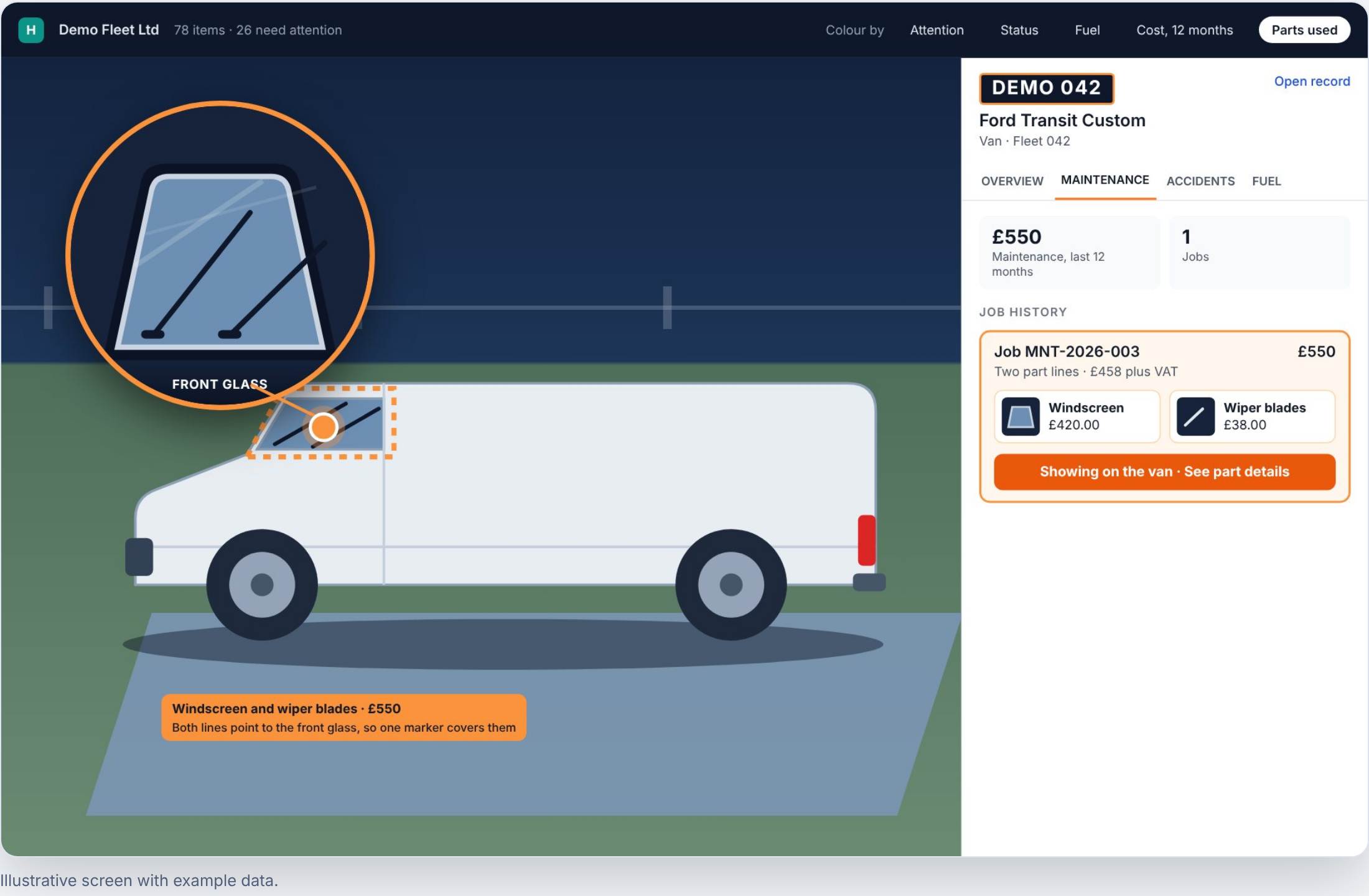
Spend Map plots each job on a 3D model of the vehicle. £550 of glass work shows exactly where it happened — on the front glass.
A report is a list. Spend Map is a picture.
Ask most systems "what did this van cost me?" and you get rows: a date, a description, a number. Scroll, add it up, try to remember which end of the vehicle keeps eating money. Spend Map answers the same question differently. It reads the jobs and parts your team already enter, and places each one on the part of the vehicle it was spent on. Windscreen, brakes, tyres, gearbox — each area lights up with what was done, when, and what it cost.
The result is instant. You don't read the expensive area of a vehicle — you see it, in seconds, and open the job behind it with a click.
Built right into MyFleet3D
Spend Map is an add-on to MyFleet3D, our live 3D view of your whole fleet. You already walk your depot in three dimensions and colour every vehicle by what needs attention. Now you can drop into a single vehicle and see its money the same way — mapped onto the bodywork, colour-coded by cost, the same fleet view you already use. No new screen to learn, no new data to enter.
🎯 Spend you can point at
See the cost on the part of the vehicle it was spent on, instead of adding up rows in a table.
⚡ Faster decisions
Spot the expensive area of a vehicle in seconds, then open the job behind it to see exactly what was done.
🔗 The fleet view you already use
It sits inside FleetEase, next to the vehicles, drivers and costs you already track. Nothing bolted on.
A bell when the same area keeps coming back
Here's where visualisation turns into money saved. If an area of a vehicle has been worked on more than once in the last 12 months, Spend Map puts a bell on it. Click it, and you see the earlier jobs, their dates and costs — and whether a warranty was recorded against them before you pay for the same repair twice.
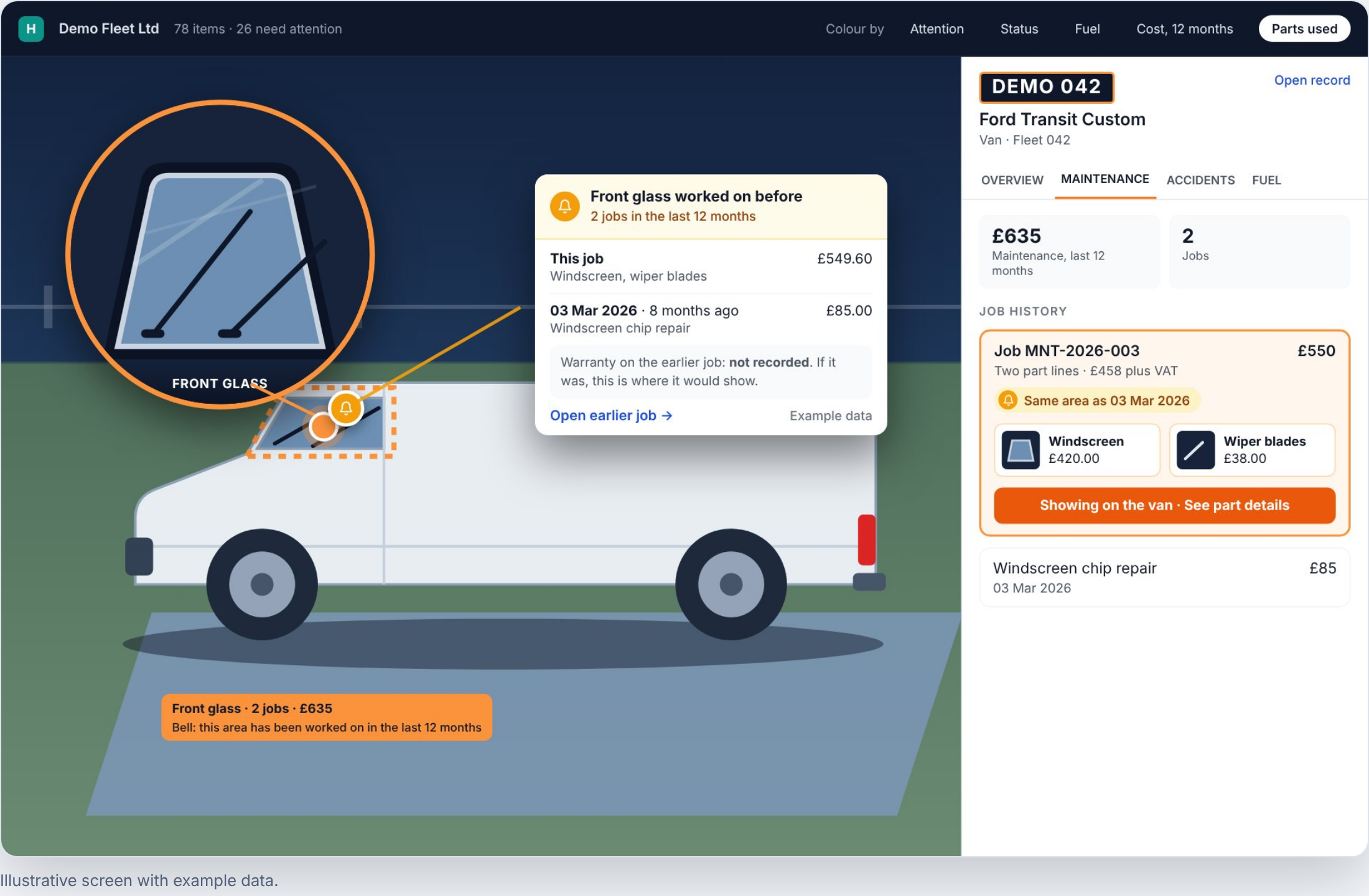
Front glass, twice in a year. The bell surfaces the earlier £85 repair — and asks whether a warranty should have covered this one.
Open any job for a closer look
Click any marker and the job opens: a close-up of the part, what was entered, the cost including VAT, and where on the vehicle it sits. Any photos your workshop attached appear alongside, as before-and-after views. Your team keeps recording jobs exactly the way they do today — the more detail they type, the more precisely FleetEase can place it.
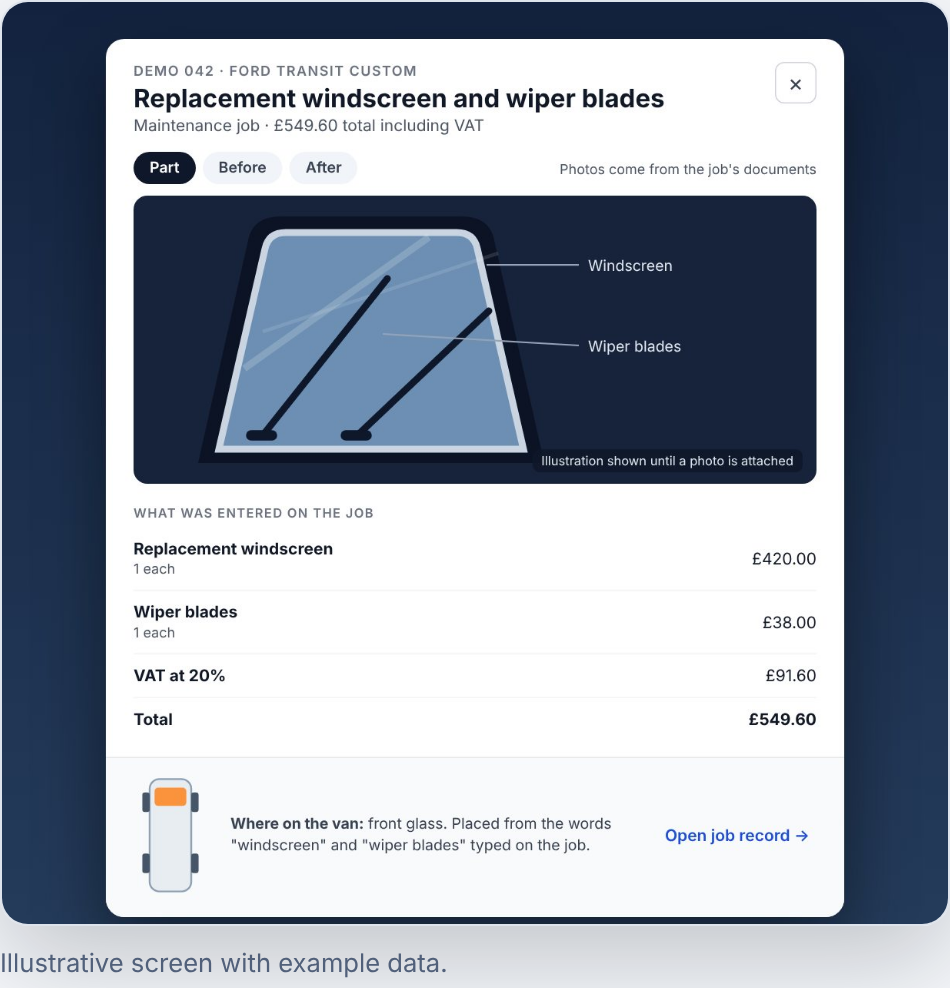
Every job opens with the part, the cost, and where on the van it happened. Illustrative screen with example data.
It doesn't tell you why. It makes you ask.
Spend Map won't pretend to know your business better than you do. What it does is put the right questions in front of you — the ones that are easy to miss in a list of invoices:
- Is the same area costing us again and again? Brakes twice in a year, the same corner of a van, the same glass — repeat work is suddenly obvious.
- Is this a driver or training question? Repeated damage or wear in one area, on certain vehicles or drivers, is a reason to look at how they're being driven.
- Is a warranty being missed? When the earlier job recorded a warranty, you see it before you pay for the same repair again.
Why this is different
Enterprise fleet platforms charge five and six figures for analytics suites, and still hand you a dashboard of bar charts. FleetEase takes the opposite view: the clearest way to understand a vehicle's cost is to look at the vehicle. That's what being a modern, 21st-century fleet platform actually means — not more tables, but a genuinely better way to see. And, like everything we build, Spend Map is designed to sit inside the flat price you already pay, not behind a premium tier.
This is what continuous innovation looks like at FleetEase. We don't wait for an annual release. We find the thing that would make a fleet manager's day easier, build it, and ship it — then move on to the next one.
See your own fleet's spend in 3D
Spend Map comes with MyFleet3D. Start a 30-day trial — every feature unlocked, no card up front, no contract.
Book a live demoFleetEase is fleet management software built for UK businesses. Explore MyFleet3D or see our pricing.
Ready to take control of your fleet?
Start your free 30-day trial. No credit card required.
Start free trial →