The sticky note problem
Every fleet manager knows the feeling. It's Monday morning. You sit down at your desk and there's a sticky note that says "chase Lex on KN14DHZ." There's an Outlook reminder about Mohamed's licence check. There's a WhatsApp message from Sarah about Ford Transit offers. And somewhere in the back of your mind there's something about an Allstar fuel card that needs cancelling — but you can't remember which driver.
Critical fleet actions live in a dozen different places: sticky notes, email reminders, WhatsApp threads, mental notes, spreadsheet tabs, and the back of envelopes. When everything's urgent, nothing gets prioritised. Lease renewals slip. Licence checks go overdue. Insurance chasers fall through the cracks. And there's no single place to answer the most basic question a fleet manager has: what do I need to do today?
We built Task Management to fix this.
Introducing Task Management in FleetEase
Task Management is a built-in action tracking system integrated directly into FleetEase. You can create, assign, prioritise, and track tasks related to any aspect of fleet operations — vehicles, drivers, compliance chasing, supplier follow-ups, or general admin. Everything in one place, visible from the moment you log in.
It's live now, included in every FleetEase subscription at no extra cost.
📋 The Dashboard Widget
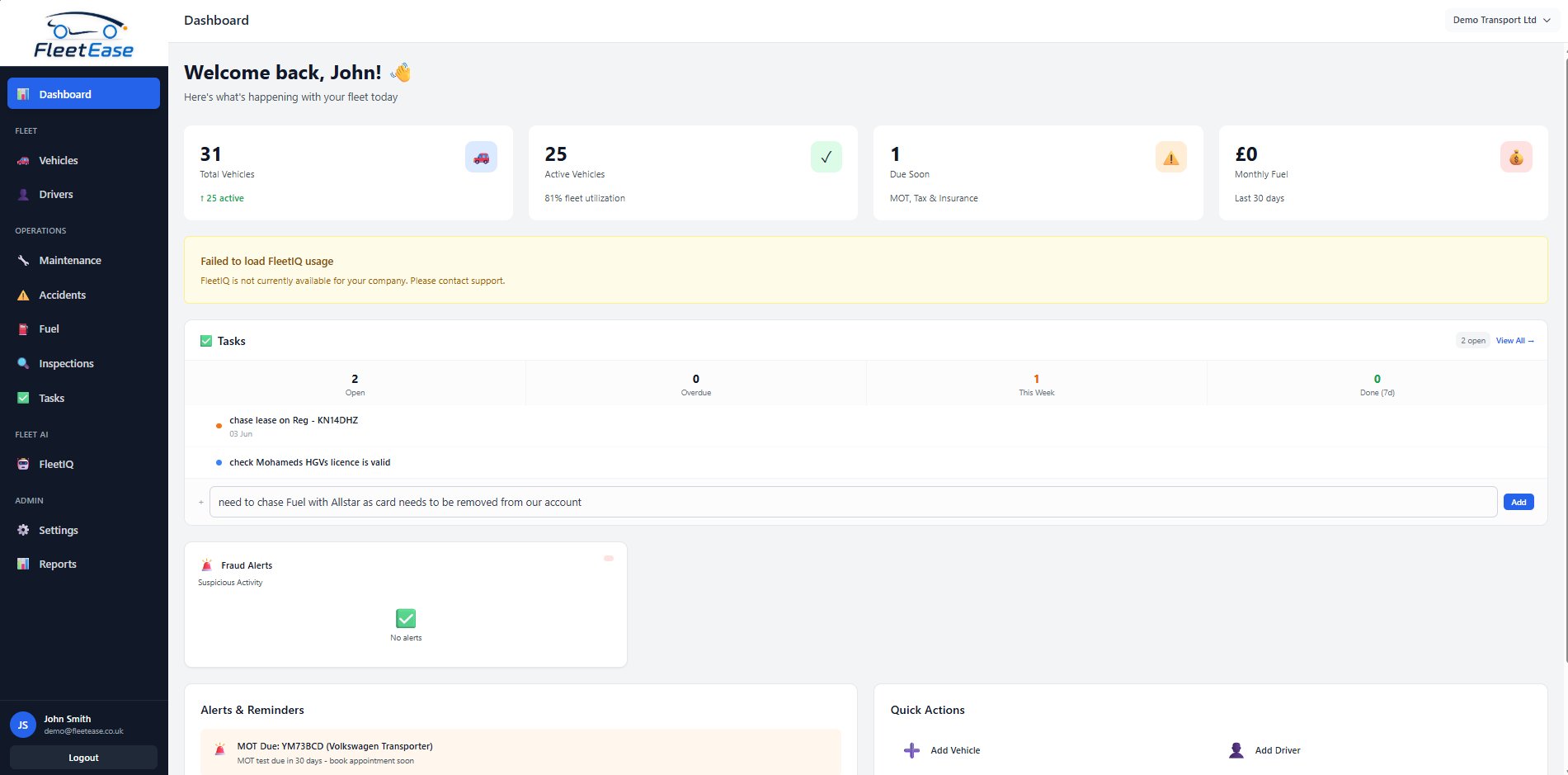
The Tasks widget on the FleetEase dashboard — showing open tasks, overdue count, and a quick-add bar for instant task creation.
The first thing you see when you log in is the Tasks widget on your dashboard. It shows you:
- Open tasks — how many actions are waiting for you
- Overdue count — anything that's slipped past its due date, impossible to ignore
- Due this week — what's coming up so you can plan ahead
- Completed in the last 7 days — a sense of progress
Below the stats, your highest-priority tasks are listed with colour-coded priority dots. And at the bottom there's a quick-add bar — type a task and hit Add without ever leaving the dashboard. Thought of something? Capture it in three seconds and get back to what you were doing.
📑 The Full Task List
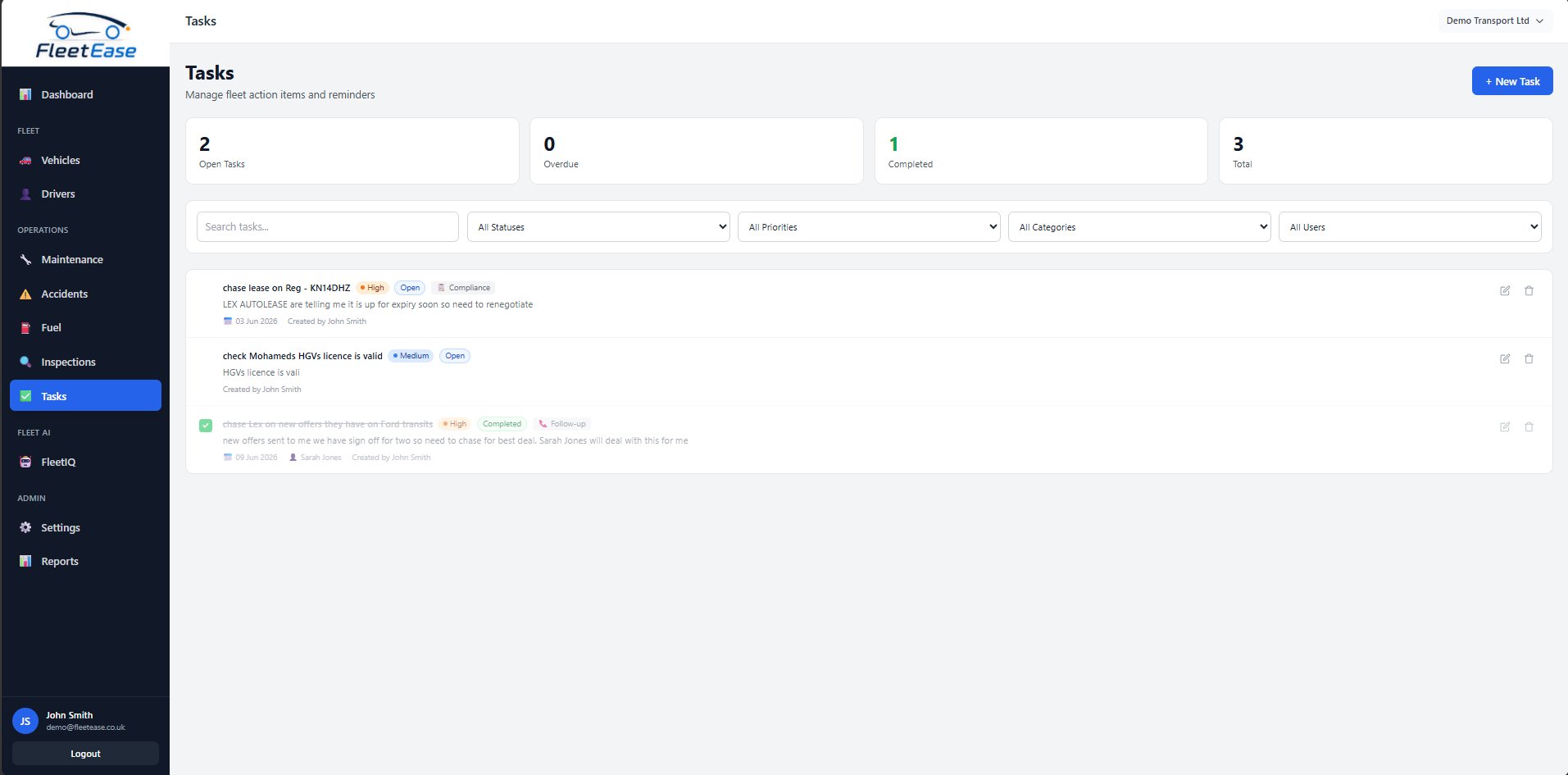
The full Task Management page — filter by status, priority, category, or assigned user. Every task shows its context at a glance.
Click "View All" or navigate to Operations → Tasks in the sidebar, and you get the full picture. The task list gives you:
- Filter by status — open, in progress, completed, or cancelled
- Filter by priority — low, medium, high, or urgent
- Filter by category — compliance, maintenance, follow-up, admin, finance, HR
- Filter by assigned user — see what Sarah's working on, or what's unassigned
- Search — find any task by title or description
Summary stat cards at the top show open, overdue, completed, and total counts. Every task shows its priority (colour-coded), status, category, due date, who it's assigned to, and who created it. Edit or delete from the list. Mark complete with a single click.
🔗 Linked to Vehicles and Drivers
This is where task management becomes genuinely useful for fleet teams — not just another generic to-do app. Tasks can be linked directly to a specific vehicle or driver record. Open a vehicle's record and you'll see a Tasks tab showing every action related to that vehicle. Same for drivers.
When you create a task from a vehicle record, it's automatically linked. When you view the task in the main list, clicking through takes you straight to the relevant vehicle or driver. Context stays connected. Nothing gets lost.
What fleet managers actually use it for
The best way to explain the feature is to show the kinds of tasks UK fleet managers are already creating:
Real-world examples
- Lease management — "Chase Lex Autolease about KN14DHZ renewal — contract expires 1 May"
- Driver compliance — "Check Mohamed's HGV licence — CPC may have expired"
- Supplier follow-ups — "Chase Lex on Ford Transit offers — we need sign-off for two vehicles"
- Fuel card admin — "Contact Allstar to cancel cancelled driver's fuel card"
- Insurance chasers — "Aviva haven't sent renewal docs — chase before 15th"
- Accident follow-up — "Chase insurer on ACC-2026-003 — no response for 2 weeks"
- Maintenance — "Get brake disc quotes for YM73BCD before MOT"
- DVLA/compliance — "Upload V5 documents for the 3 new Transits"
- Financial — "Submit P11D report to payroll by 6 July"
- Delegation — "Sarah to chase best deal on Transit leases — she's got the contacts"
Every one of these would previously have been a sticky note, an Outlook reminder, or — worst case — something lodged in someone's memory that gets forgotten when they go on holiday.
Why this matters for your fleet
Everything in one place
No more scattered sticky notes, Outlook reminders, and WhatsApp threads
Contextual
Tasks live on the vehicle or driver they relate to — not in a disconnected app
Team accountability
Assign tasks to colleagues, track who's responsible, see completion
Audit trail
Who created it, who completed it, and when — automatically recorded
The dashboard makes overdue tasks impossible to ignore. Priorities float to the top. Categories let you focus on compliance one minute and finance the next. And because it's built into FleetEase — not a separate app — your tasks have context. Click a task about KN14DHZ and you're looking at that vehicle's full record. No switching between systems.
No extra cost. Already live.
Task Management is included in every FleetEase subscription. There's nothing to enable, no module to upgrade to, no per-user charge. It's already in your sidebar under Operations → Tasks. Log in and start using it today.
And like everything in FleetEase, it works on your phone and tablet. Thought of something while walking the yard? Add a task from your phone. Checking off actions during a depot visit? Mark them complete from your tablet.
This is what happens when fleet software is built by a team that ships daily, not quarterly. A feature that every fleet manager needs, delivered as part of the platform, at no extra cost, and available immediately.
Your fleet to-do list just found a proper home.
Ready to take control of your fleet?
Start your free 30-day trial. Task Management included on every plan.
Start free trial →