This morning, a customer asked a simple question: "Can I take a photo of a garage invoice and have it automatically fill in the maintenance record?"
It's the kind of feature that every fleet manager would love. Instead of manually typing in supplier details, line items, labour costs, and VAT from a paper invoice, you just snap a photo — and the system does the rest.
With traditional fleet management software, this kind of feature sits on a roadmap for months. It requires OCR specialists, custom parsing logic for every invoice format, and weeks of testing.
We built it, tested it, and deployed it in 2 hours.
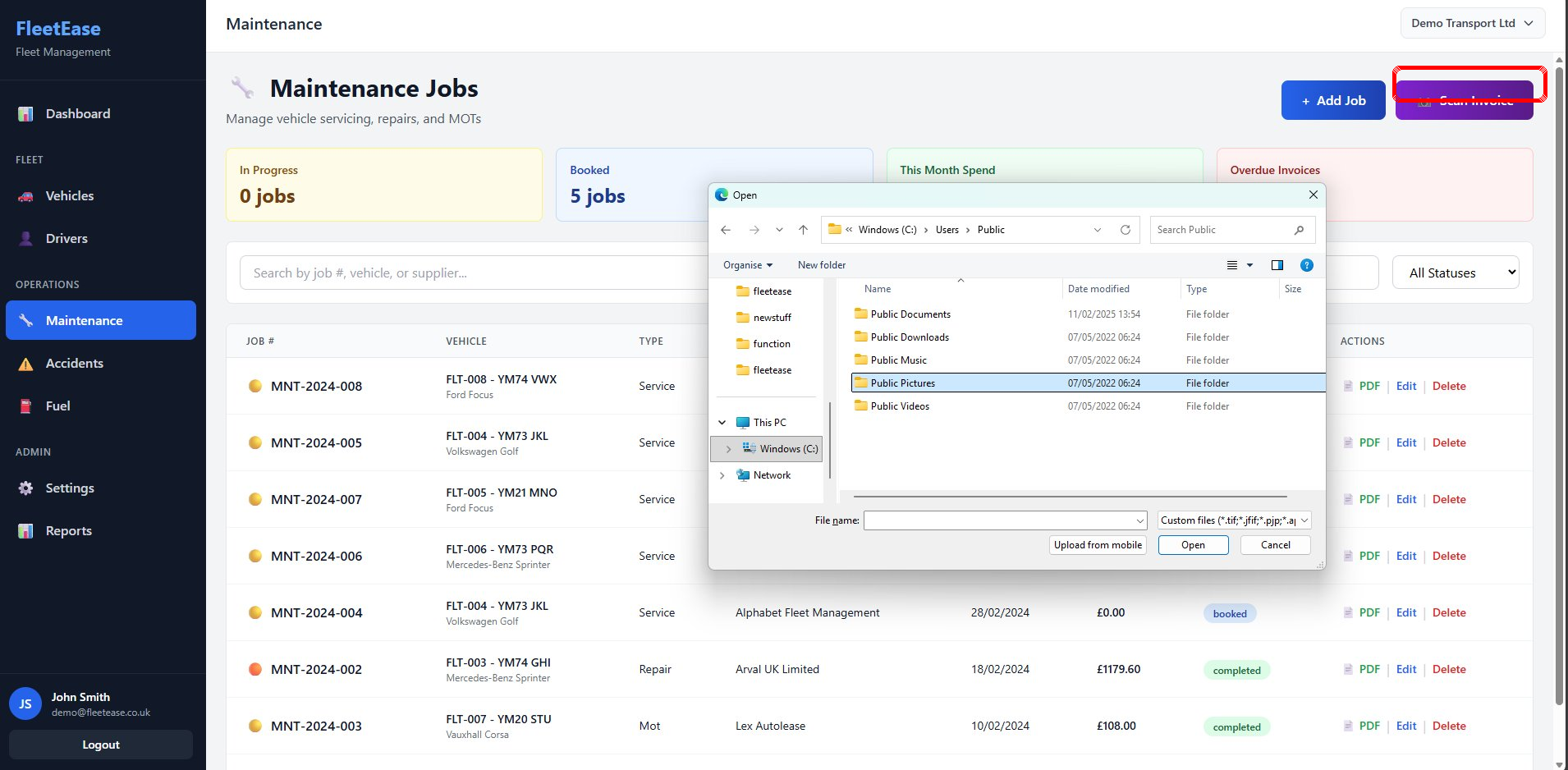
The new "Scan Invoice" button on the maintenance page — one click to upload, seconds to extract.
The 2-Hour Timeline
Customer request received
The customer explained the pain: every maintenance job means manually re-typing invoice details from paper into the system. Supplier name, date, each line item, labour hours, parts costs, VAT breakdown, total. It's tedious, error-prone, and time-consuming.
Solution designed
A "Scan Invoice" button on the maintenance page. User uploads a photo or PDF. The image is sent to Claude's vision API. Claude reads the invoice — printed, handwritten, or photographed at an angle — and returns structured JSON with every field extracted. The form pre-fills automatically.
AI agents start building
Backend: new API endpoint that accepts an image and calls Anthropic's Claude API with a structured extraction prompt. Frontend: upload component, loading state, pre-filled review form with editable fields. Image storage against the maintenance record as proof.
Testing complete
Tested with printed invoices, handwritten invoices, PDF invoices, and photos taken at angles. Claude handled them all — extracting supplier, date, line items, quantities, unit costs, labour, VAT, and totals consistently.
Deployed to production
Live. Every FleetEase user can now scan a maintenance invoice and have it auto-fill their records in seconds.
How It Works — In Plain English
Snap or Upload
Take a photo or upload a PDF of any invoice
Claude Reads It
AI extracts supplier, dates, line items, costs, VAT
Review & Save
Check the pre-filled form, link to vehicle, save
That's it. No manual typing. No copying numbers from paper. The original invoice image is stored against the maintenance record as proof — perfect for audits, insurance claims, and HMRC queries.
Why Claude Beats Traditional OCR
You might wonder why we didn't use a standard OCR service like Google Vision or AWS Textract. The answer is simple: those tools read text. Claude understands invoices.
📋 Traditional OCR
Gives you raw text from the image. You then have to write custom parsing rules to figure out which text is the supplier name, which is the date, which are line items. Every invoice format needs different rules. A Kwik Fit invoice and a local mechanic's handwritten one need completely different parsers.
⚡ Claude Vision AI
You send the image and say "extract the invoice data." Claude understands what an invoice looks like — regardless of format, layout, or handwriting. It returns structured, labelled data: supplier, date, line items, costs, VAT, total. One approach handles every invoice format.
This is the difference between a tool that reads characters and one that understands documents. Claude can handle a professionally printed Halfords invoice and a scribbled note from a local garage with equal accuracy — because it understands the context, not just the pixels.
What Gets Extracted
When you scan an invoice, Claude extracts and pre-fills:
- Supplier name — the garage, dealership, or parts supplier
- Invoice number and date
- Line items — each part or service with description, quantity, and unit cost
- Labour hours and rates
- VAT breakdown
- Invoice total
The user reviews everything in an editable form, links it to a vehicle, and saves. The original image is attached to the record permanently. If anything looks wrong, you just correct it before saving — Claude is an assistant, not an automaton.
Another Promise Kept
We've said from day one that FleetEase ships features at the speed of ideas. We proved it with multi-company switching in 48 hours. Today we've done it again — AI invoice scanning, from customer request to production in 2 hours.
This is what happens when fleet management software is built on Anthropic's Claude platform. The AI doesn't just power the features — it powers the development itself. AI agents working around the clock, in parallel, building and testing production-quality code at a pace traditional development simply cannot match.
Most fleet management software doesn't have invoice scanning at all. The few that do charged tens of thousands to build it over months. FleetEase built it in a morning.
That's the FleetEase difference. Your ideas. Our AI. Live before lunch.
Try Fleet Software That Moves at the Speed of Ideas
AI invoice scanning, multi-company switching, MFA security — all shipped in days, not months. From £25/month.
Start Your Free Trial← Back to Blog · Explore Features · See Pricing
Ready to take control of your fleet?
Start your free 30-day trial. No credit card required.
Start free trial →